Human Voice Controlled Intelligent System Assists Disabled People Smartly

An AI-powered voice control system enhancing digital accessibility for individuals with physical disabilities

Soumyajit Das

Budge Budge Institute of Technology

Arijit Payne

Budge Budge Institute of Technology

Rishab Sen

Budge Budge Institute of Technology

Ankanendu Mondal

Budge Budge Institute of Technology

Priyash Das

Budge Budge Institute of Technology

Dr. Munshi Yusuf Alam

Budge Budge Institute of Technology

Supported by organization BBIT, Kolkata

Abstract

The increasing adoption of voice-enabled technologies has highlighted their potential to empower individuals with physical disabilities, enabling them to independently navigate digital platforms. However, challenges such as noise interference, limited command vocabulary, and platform incompatibility persist.

Our research product, which makes use of state-of-the-art technologies including AI, Natural Language Processing, and Automatic Speech Recognition (ASR), is a Voice-Controlled Integration System. Key concerns including cross-platform usability, noise resilience, and speech recognition accuracy are addressed by the system, which seeks to offer hands-free control over computers and communication platforms for amputees. Through the integration of features like as voice-controlled media playing, speech-to-text, and application navigation, the solution provides increased accessibility and independence with a certain degree of precision.

disabled person voice conferencing application control virtual mouse voice intelligent accessibility assistive technology

Introduction

Voice technologies have a clear future in helping people with physical disabilities specially amputees communicate with the digital world independently. However, a few challenges remained, such as noise interference, limited contextual understanding, and a deficiency in platform compatibility.

According to recent studies, around 40% of physically disabled individuals use voice commands for web browsing, yet only 2% of websites are fully assistive technology compatible. Such statistics signify the need for vigorous and universal solutions to accessibility challenges.

There are currently more than 1 billion disabilities in the world, so there is an increasing demand for technologies that can make things accessible and usable.

Voice-activated systems based on development in Automatic Speech Recognition and Natural Language Processing can be very promising, but they are often challenged in "real-life" environments, especially in noisy conditions or while supporting multilingual users. Fixing these issues is significant to return the benefits of such systems into the more extensive user community.

Methodology

Our project aims to provide a voice-controlled system "SONIX" tailored specifically for individuals with physical disabilities who have lost the ability to use their hands due to congenital conditions or accidents. The methodology is divided into three key phases: Input, Processing, and Output.

Input Phase

  • Voice Capture: External microphone for high-quality audio signals
  • Noise Handling: Real-time noise cancellation and filtering
  • Multi-language Support: Accommodates diverse accents and languages

Processing Phase

  • Speech Recognition: ASR converts speech to text
  • Intent Analysis: NLP interprets user commands
  • Action Mapping: Commands mapped to predefined actions
  • Offline Capability: Functions without internet dependency

Output Phase

  • Dual Feedback: Audio (TTS) and visual confirmation
  • Application Control: Hands-free operation of software
  • Cross-platform: Works with Google Meet, Zoom, Office, etc.

Technical Stack

  • Frontend: HTML, CSS, JavaScript, ReactJS
  • Backend: Python with MongoDB/MySQL
  • Libraries: SpeechRecognition, PyDub, DeepSpeech
  • APIs: Google Meet, Zoom, Microsoft Office
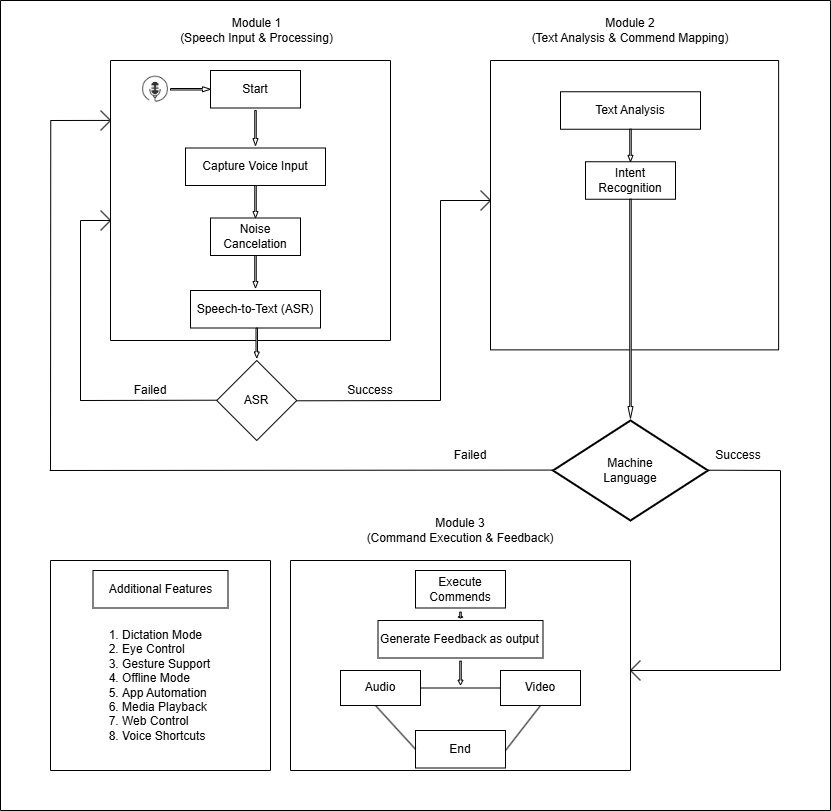
SONIX System Diagram
Figure 1: SONIX: Intelligent Voice Controlled System

User Profiles & Capabilities

Person 1: Meeting Management

  • Google Meet controls
  • Start/end meetings
  • Mic/camera toggle
  • Send invitations
  • Chat functions

Person 2: Media Control

  • YouTube playback
  • Play/pause videos
  • Volume adjustment
  • Fullscreen mode
  • Offline media play

Person 3: Web Browsing

  • Google/Wikipedia search
  • Read results aloud
  • Navigate web pages
  • Open links
  • Content scraping

Person 4: Document Handling

  • MS Word operations
  • Voice typing
  • Text formatting
  • Document saving
  • Email attachments

Results & Discussion

Success Rates

Person 1: Meeting Management

90% success rate

Person 2: Media Control

80% success rate

Person 3: Web Browsing

70% success rate

Person 4: Document Handling

80% success rate

Performance Accuracy

MS Word Tasks

95% average accuracy

Virtual Mouse Control

85-95% accuracy

Noise Resilience

92% accuracy in noisy environments

Multilingual Support

55% accuracy with diverse accents

Conclusion & Future Scope

The application runs on the Microsoft Windows operating system and is tested by four disabled individuals with different accents and voices. An eye gesture virtual mouse allows the user to write in Microsoft Word with formatting capabilities, manage and conduct video meetings, and operate installed applications.

In addition to sending and receiving emails, this model allows you to open any mail browser, check your junk folder, clean out your inbox, and browse the internet without any issues. Also, the model might eventually be able to zip any file, copy it, and transfer it across the system as well as platform independent with suitable and reliable system security.

Future Enhancements:

  • Expanded platform compatibility (Linux, macOS)
  • Enhanced gesture recognition capabilities
  • Integration with smart home devices
  • Advanced context-aware command prediction
  • Improved noise cancellation algorithms